
Scroll for zooming over the pictureClick on the picture for zooming
/
description
Give the gift of adventure
In the role-playing game Dungeons & Dragons, you create your own story together with your friends and immerse yourself in a world full of adventure where anything can happen.
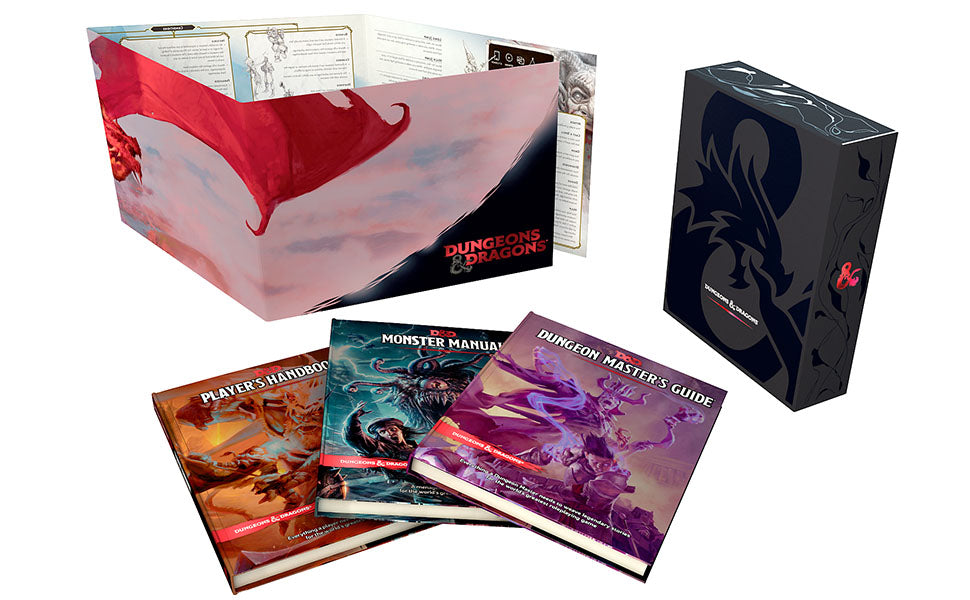
This gift set contains all the books you need to play, with special foil covers that can't be found anywhere else, as well as an exclusive game master screen with a foil finish.
Whether for new players, budding gamemasters, longtime fans without their own books or collectors looking for their treasure, this set is the perfect gift for any Dungeon & Dragons fan.
Whether you're inventing your own world or immersing yourself in a prescribed setting, these three books are the foundation for any D&D adventure.
Player's Handbook - the essential D&D rulebook for players and gamemasters alike. This book will teach you how to play the game, how to create characters, and includes an index of over 350 spells.
Dungeon Master's Guide - this book teaches gamemasters how to run a D&D adventure, create worlds for the players, fill them with legendary treasures, and weave a great story.
Monster Manual - a bestiary full of wondrous creatures and compelling characters for gamemasters to populate their D&D worlds, including all the details they need for exciting encounters.
All 3 core rulebooks
Not a children's toy
WARNING! Not suitable for children under 36 months due to small parts that may be swallowed.
Manufacturer Information
Name: Hasbro European Trading BV
Address: Hasbro European Trading BV, De entr�e 240, 1101 EE Amsterdam, Netherlands
Website: https://consumercare.hasbro.com
European Manufacturer: Yes
Matching items
Recently viewed
Opens in a new window
PayPal Pay Later Messaging
Step 1: Choose message placement
Click the button below and then hover over your page to select a placement.
Step 2: Paste and save
You have copied the placement for the Product Page.
Go back to the App Embeds section, and in the Paypal Advanced Settings, paste the copied value into the
Product Page field and click the 'Save' button in the top right corner.